
Quick Links
Assuming you have it set up right, Windows Search is pretty powerful. Today, we'll show you how to find files you've recently modified, and how to save those searches for quick access any time.
We're going to be searching directly from File Explorer in this article, though that's just one of the ways to search files in Windows. There are times you'll want to search for files that have been recently created or modified. Maybe you recently changed a file, but can't remember where you saved it. Or maybe you accidentally allowed a third party software installation, and want to locate those files quickly. Whatever the reason, it's easy enough to find files based on their time stamps.
Understanding File Time Stamps
Every file on a Windows system has one or more time stamps. The three primary time stamps you'll work with include:
- Date Created: The date and time when the current instance of the file was created. This value is set and Windows itself will not change the value. Some third party tools do allow you to change this value.
- Date Modified: The date and time the file was last written (i.e, when its contents were last modified). Renaming the file doesn't change this time stamp. Neither does opening the file without making any changes to it.
- Date Accessed: The date---and on NTFS volumes, the time---when the file was last accessed for either reading or writing.
There are also a number of other times stamps available in Windows that are used on certain file types, or under certain circumstances. For example, a Date Taken time stamp is recorded when images are captured with a camera. Other time stamps may be created and used by certain applications. For example, backup software can make use of a Date Archived time stamp and some office applications make use a Date Completed time stamp to mark a finished document.
View Time Stamps in File Explorer
You can easily view time stamp information for items in File Explorer. To view details for a single file, right-click that file and choose "Properties" from the context menu.

In the file's properties window, switch to the "Details" tab, and then scroll down toward the bottom.

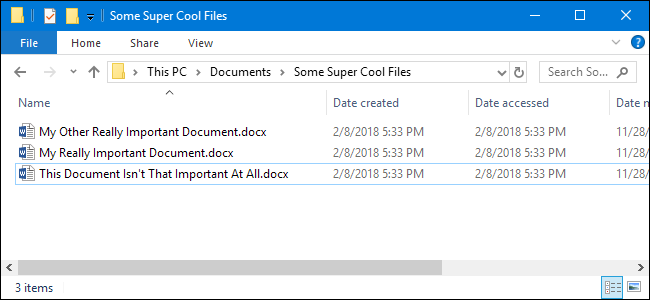
If you want to view the time stamp information for all items at a glance, you can do so in File Explorer's Details view. In the File Explorer window, on the "View" tab, click the "Details" option. This switches your view to a column layout.

By default, only a column for the "Date Modified" time stamp is shown. To add other time stamps, right-click anywhere on the column header, and then choose the "More" option.

In the "Choose Details" window, scroll down a bit, and you'll see a lot of "Date" entries. Choose the ones you want, and then click the "OK" button. Here, we're just choosing the basic "Date Accessed" and "Date Created" time stamps to add to our File Explorer view.

Back in File Explorer, you can see the new columns have been added. You can drag the column headers around to arrange their position, or click on a header to arrange the files in your window according to that value. Reordering like this makes it very easy to find files you've recently accessed or modified.

Adding these time stamp columns works great if you know generally what folder you've stored a file in, or don't mind doing a little digging around. But what happens when you're not sure where you put something you've worked on recently, or you just want a broader view of recent files? For that, we'll turn to Windows Search.
View Recent Files Using Windows Search
If you want to see all the recent files on your system, Windows Search is the answer.
Start by opening File Explorer to the top level folder you want to search. For example, selecting your Documents folder searches everything in that folder and all the subfolders it contains. Selecting your C: drive searches everything on that drive. And selecting "This PC" searches everything on all your drives.
File Explorer has a convenient way to search recently modified files built right into the "Search" tab on the Ribbon. Switch to the "Search" tab, click the "Date Modified" button, and then select a range. If you don't see the "Search" tab, click once in the search box and it should appear.
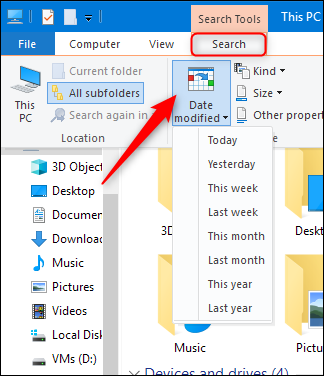
Here, we've performed a search for files modified in the last week.

Note that selecting this command automatically entered search terms into the search box in the File Explorer window (outlined in red in the screenshot above). You can these search terms yourself if you prefer to just type your search.
In the File Explorer window, type "datemodified:" into the search box. You can also type "datecreated:" or "dateaccessed:" into the box if you want to search by those values instead. The moment you type the colon after the field you're searching by, a popup appears that you can use to narrow your search. Select a specific date on the calendar, hold the Control key down while clicking to select a date range, or select one of the preconfigured ranges listed under the calendar.

You can also continue typing your dates or ranges instead of using the popup. You can type in any of those preconfigured ranges (today, yesterday, this week, and so on) right after the "datemodified:" search term. An example search might look like this:
datemodified:last week
You could also type a specific date using regular date formats. The specific formats you can use depend on how your system is set up, but if you're set up with United States date formats, you can use several variations. For example, to search for files modified on February 8, 2018, you could type the following search:
datemodified:02/08/18
You could also use:
datemodified:2/8/2018
or even:
datemodified:Feburary, 8 2018
And to type a date range, just use two dates separated by two periods. For example, to search for files modified between February 6 and 8, 2018, you would use:
datemodified:02/06/18..02/08/18
Save Searches For Easier Access
Performing searches for recent files is pretty straightforward, but if you want to make things even easier, you'll be happy to know that you can save searches so that you can quickly repeat them later. Check out our article on the subject for the full procedure, but here's the short version. After performing a search, return to the "Search" tab in File Explorer, and click the "Save Search" button.

By default, searches are saved in a folder named "Searches" that you can find inside your user folder---typically at "C:\users\<username>\"---though you can save a search anywhere you like. (In Windows 7, they're saved in the "Favorites" folder.)
The Searches folder is a convenient enough place to store them, but it's even handier if you right-click the folder and choose "Pin to Quick access" from the context menu. Then, it'll show up in File Explorer's left sidebar.

After that, all you have to do is select a saved search to run it again immediately.