How-To Geek
How to Put the New New Twitter Content Pane Back on the Left

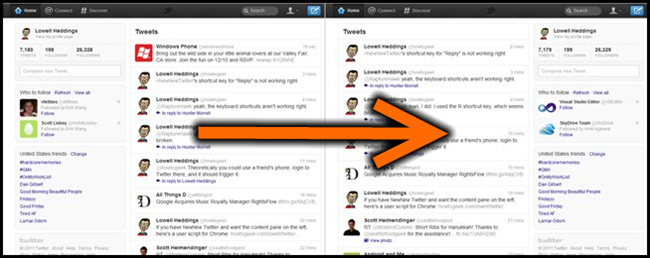
If you’ve managed to get access to the newest version of the Twitter web site, also known as #NewNewTwitter, you might have noticed that the content is now on the right-hand side, which just feels unnatural. Here’s how to fix it in Chrome or Firefox.
It’s pretty simple—all you need to do is install a quick user script. Chrome users can simply click the link, but Firefox users will need to install the Greasemonkey extension first. Internet Explorer users… well, you’re out of luck.
Disclaimer: This is a simple script and shouldn’t break your browser, but if it does, it’s not my fault. If you want to uninstall the user script, you’ll want to open up Tools –> Extensions and you can disable it from there. Note: user scripts break all the time when the original site is updated. This one is pretty simple, but if you are reading this next year, it probably won’t work.
Install the Fix Twitter: Move Content Pane Left user script (view source)
Got Feedback? Join the discussion at discuss.howtogeek.com
Comments (19)
Programmer by day, geek by night, The Geek, also known as Lowell Heddings, spends all his free time bringing you fresh geekery on a daily basis. You can follow him on Google+ if you'd like.
- Published 12/9/11


How do you install the user script? I clicked on it and it just looks like the “view source” page.
@John,
If you’re using Chrome it should show in the download bar.
For Firefox you need to have greasemonkey installed – then when you click on the link you should get a pop up about installing the script.
http://i.imgur.com/4t2g3.png
No possible way I am going to install this script.
And if you’re using Opera… http://www.howtogeek.com/howto/3986/set-up-user-scripts-in-opera-browser/
it says the download can access all internet data… not sure if its worth trusting.
All user scripts have that problem, I think.
Download the source, make your own.
It worked for me on Chrome.
It didn’t work for me on Firefox version 8.0
You do not use three consecutive dots, you actually use the ellipsis glyph… please, allow me to love you.
Didn’t work in FF 8.0
How can you add back the dark line between the last tweet read. That is the most annoying feature removal I have found. When I click to view new tweets I now have to search for were the last one was and start reading from there.
Try this script:
http://userscripts.org/scripts/show/120041 Works for FF 8.0 for me.
It’s almost like the people redesigning these things have never actually used them.
Thanks Dave – the fix int he article didn’t work for me but yours worked like a charm!
I like the new layout. Get used to it or use a third party app.
THX DAVE !!
Its not working. I installed Grease Monkey and the script but its still on the right side…
It only work for me in Opera.
What I meant to say was that it doesn’t work for me in Opera.