• ARTICLES
SEARCH

How-To Geek

How to Search for Line Breaks, Tabs, and Special Characters in MS Word

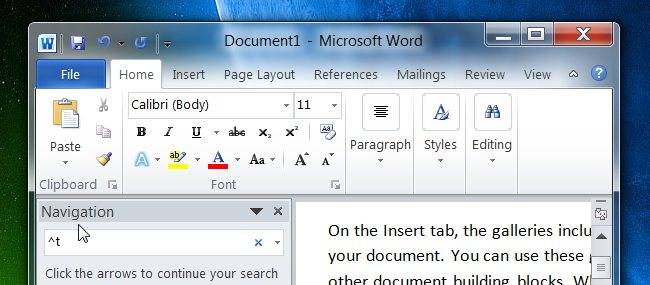
Over at the Technet Magazine blog, they’ve posted a very useful article that explains how to search for special characters like line breaks, tabs, or even white space. All you have to do is use a special modifier in the search box.

For instance, if you wanted to search for a word with a tab character in front of it, you could use ^tWord or something similar. Here’s a few of the entries from the table:

Search String Searches For
^l (lowercase L) Manual line break
^p Paragraph break
^n Column break
^m Manual page break
^b Section break
^t Tab character

Hit the link for the full list of special characters.

20 Helpful Search Strings for Finding Special Characters in Word [Technet Magazine Blog]

Comments (2)

  1. Tahmar

    To the How to Geeks -
    …..and you really do know how to !!!
    I have had 2 so called computer technicians ( one with a 4 year Computer Science degree ) come to my home and try to network 2 printers – one is an old HP Laserjet 4P and the other a HP Photosmart C4680 both installed on one Computer with XP Pro o/s and the other a Laptop with Windows 7 Home Premium o/s and they could not get it right – I am a subscriber to your daily emails and I found the mail about “Sharing files and Printers between Win 7 & XP – I followed your excellent instructions explicitely and am so pleased to inform you that the LaserJet works on both computers and the Photosmart only on the XP , but at least I have one working on both computers, I will try to find the issue with the PhotoSmart as your instructions worked perfectly for the LazerJet.

    I LOVE YOUR EMAILS – most of which are greek to me as I am not very computer savy, just an old woman in late 60′s that has had so much help from your mails content and just want to say THANK YOU – thank you so very much and will be sending a small token of appreciation as soon as I find your mailing address. – Whoever writes these mails and instructions are to be commended – they are precise, and in layman’s language that even someone like myself can read and understand. – you make my computing life so much easier – Thank You again!!

    Tahmar

  2. HoX

    Great! Thanks. You saved my bacon.

Programmer by day, geek by night, The Geek, also known as Lowell Heddings, spends all his free time bringing you fresh geekery on a daily basis. You can follow him on if you'd like.

  • Published 08/27/10

RECOMMENDED POSTS