
Today we will look at a quick way to easily clear out a clogged outbox. Perhaps you have ran into this scenario when after sending an email you see a message or two hanging in the outbox. This usually happens if there are attachments that are too large (approximately 5MB or larger) to be easily sent.
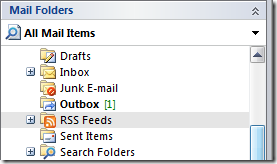
When there is an email stuck in the outbox you will see something similar to the screen below.
When you open the Outbox folder and try to stop the mail you will get an error message.

To stop the message from transmitting go to File Work Offline.

Now you can go into the Outbox folder and open the email message and scale down the amount of attachments,compress the current one, or remove it all together and use another method to transfer the file. When your finished just go back to File Work Offline and uncheck it so email will start working again.
