
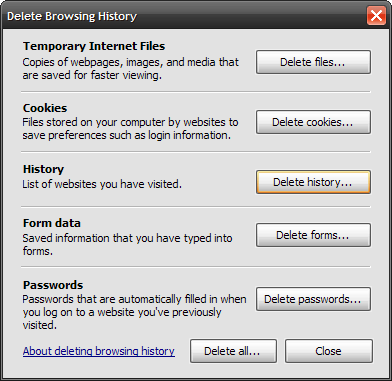
If you have an older PC which has not had regular maintenance, updates, etc. (a relatives computer you looked at over the holiday) ... when trying to run Disk Cleanup it may hang or take ridiculous amounts of time to complete. Usually what this means is the Disk Cleanup Utility is getting hung up on a corrupt temp file. Here is an easy way to get past that annoyance. Do the following steps before running Disk Cleanup. If they are running Internet Explorer go to Tools Internet Options Browsing History Delete. This brings up the Delete Browsing History window. Delete Temporary Internet Files. Click Yes to the warning message.

Another thing to do is close out of all running programs. In fact you may want to boot into "Safe Mode" before beginning this step. go to Start Run type in %temp% ... Hit enter or click OK.

This brings up the Temp file directory. Hit "CTRL+A" on the keyboard to select all folders and hit the "Delete" key.

Choose Yes to the verification message. Now make sure you delete those temp files from the Recycle Bin.

This should allow for a much faster Disk Cleanup process.