How-To Geek
How to Install Android on Your HP Touchpad

What’s better than a $100 tablet? A $100 tablet that can run two operating systems! The TouchPad was a great bargain and now that you’ve figured out webOS, try Android. Here’s how to install it in 3 easy steps.
While webOS is not completely dead and the TouchPad is still supported by HP for it’s software and hardware, a $100 tablet that can run two operating systems is always better than just one. Ever since HP announced the fire sale, multiple groups vowed to port Android to the discontinued tablet and there was even a $2000 bounty for the first team to successfully do it.
Some things to note before running Android on your HP TouchPad.
- Doing so will void your warranty
- This is a multiboot system that will allow you to run webOS or Android by rebooting the device
- This is an early alpha release of the software (entitled “Lower Your Expectations”) which means there are bugs and you alone are responsible if something breaks
- There are hardware and software incompatibilities when running Android on the TouchPad
- This release runs the non-tablet version of Android 2.3 because Google never released the source code for Android 3.0 “Honeycomb.” This means that apps designed for Android 3.0 will not work.
Before you continue, you should check out the long winded forum thread which explains everything in detail and is where you will want to go for support and updates.
[UPDATE] There has been a newer version posted in the forum link above. Please use that to download the latest release. The rest of the how-to will continue as normal.
Download Files
First thing you need to do is download the following files to your computer.
Download and install Palm Novacom on your computer. You can download this by installing the webOS SDK free of charge. It runs on Windows, OS X, or Linux. You don’t have to install Virtualbox, or Java so you can just skip straight to the SDK download and install it.
If you do a custom installation, just make sure you install novacom which is also known as the command line interface tool.


Download moboot from Google code. (do not unzip the file)
Download CyanogenMod 7.1.0 ALPHA 1 from the original thread (above) or from our mirror here. (do not unzip the file)
Download Clockwork recovery from the original thread or from our mirror here. (do not unzip the file)
Download ACMEInstaller from the original thread or from our mirror here. (unzip and extract the files in step 3 below)
Copy Files to the TouchPad
Boot the TouchPad in webOS and plug it into your computer with a microUSB cable. When the TouchPad is plugged in, tap to share device in USB Drive mode.


Once the drive mounts, create a cminstall folder and copy the CyanogenMod zip file, the ClockworkMod zip file, and the moboot zip file into the folder.


Before you go any further, make sure you have at minimum 2 GB of space available on your TouchPad’s media drive. CyanogenMod will require 2 GB for system files and will resize your media partition.
Unmount/eject the TouchPad from your computer but leave the USB cable connected.


Install Bootloader
Turn off the TouchPad by holding the power button and select power off.


Next, turn on the TouchPad and immediately push the volume up button until you get a big USB symbol on your screen.


Extract the files from the ACMEInstaller.zip into your c:\Program Files\Palm, Inc folder or wherever your novacom executable file installed (Linux and OS X will be different).


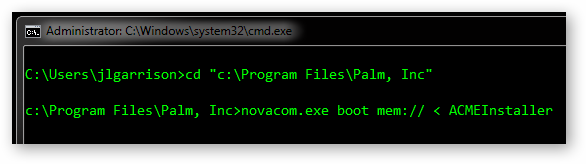
Open a command prompt on your computer and use the cd command to navigate to the folder you transferred the ACMEInstaller to earlier (C:\Program Files\Palm, Inc for Windows). Then run the command
novacom.exe boot mem:// < ACMEInstaller
Your TouchPad will reboot in a few seconds and you will get a Linux boot screen with our good friend Tux sitting atop scrolling text.


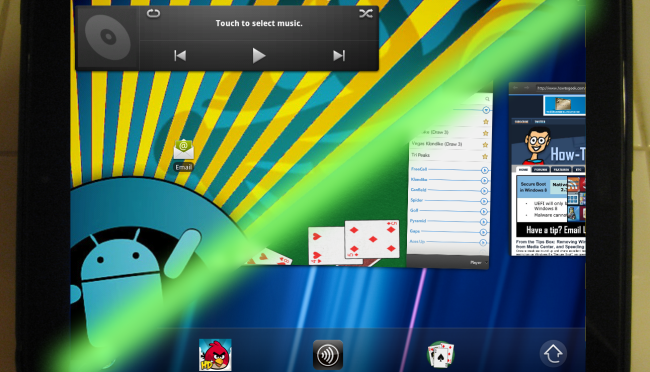
Once the TouchPad boots you will have a fully functional Alpha version of CyanogenMod 7.1


Switching Back to webOS
To switch between the two operating systems you can just reboot the device and using the new bootloader, select your desired operating system using the volume keys and home button.


Optional – Install Google Market
CyanogyenMod does not come with any official Google apps or access to Google’s market (only sanctioned devices get that privilege). Android may be boring without all of the available apps though, so here is how you can better your Android experience by installing Google’s Market and official apps.
First you need to download the Google Apps package from the CyanogenMod wiki found here. You will want the pakage for CyanogenMod 7 but don’t extract the files. Plug your TouchPad into your computer and browse to the cminstall folder we created earlier. Copy the gapps…zip file to that folder and reboot the TouchPad.


When moboot comes up select boot ClockworkMod and push the home button.


Use the volume buttons to navigate to install zip from SD card and push the home button.


Select choose zip from SD card and then navigate to the cminstall folder and select the gapps…zip file.


Navigate back to the home screen and reboot the device. You will need to go through the basic Android setup this time but you will get full access to Google’s available market apps including Google Maps, Gmail, etc.


Got Feedback? Join the discussion at discuss.howtogeek.com
Comments (169)
Justin is a Linux and HTPC enthusiast who loves to try new projects. He isn't scared of bricking a cell phone in the name of freedom.
- Published 10/14/11


Great work, Justin.
ran this last night works a treat would like to know how and if you can edit the moboot file to make it look a little more intresting if anyone has any luck or is trying let reply to this thread would like to have a luk maself.
This going to be a very popular topic :D
You finally found a use for the $99 touchpad !
Justin, I think you should correct about source code release, Google did release source code of 2.3 Gingerbread, but didn’t for 3.0 honeycomb (which is the tablet version of android).
I also echo x3geek’s statement and want to add that CyanogenMod 7.1 is based off of 2.3 (and if they are truly running the latest version of CM, it is based off 2.3.7).
When you say “Google never released the source code for Android 2.3 “Gingerbread.” This means that apps designed for Android 2.3 will not work,” I’m quite sure that what you actually mean is “Android 3.0, ‘Honeycomb’”.
Great guide! Thanks!
I hope you can include a clean UNinstall Guide as well. Making sure that it is back to HP factory settings and even restoring all partitions that was used by Android.
This will be great for people who wants to go back to WebOS and save up some free space that Android used.
Thanks.
So proud that Android has the flexibility to do this and to see this finally done right.
Woops, I just fixed the post. That’s what happens when I write posts too late at night. All the desserts just get mixed up in my head and I get hungry.
I have been unable to find a walkthrough (or any tangible info) for this when starting with the Slate that was launched with Win7. Does anyone have any info for this? I heard that the hardware was different, but I have not confirmed that as of yet.
Dude this is awesome! works!!! not bad for ALPA
Does thos support touch screen?
Where are you getting them for a hundred beans?
You cant anymore. They were on Fire Sale not long ago. I got mine for $100
We bought 4 @ that price.
Install ADWlancher EX works awesome on TP
Guys. I have a go-forward plan. I won’t look at the forums ever again. I will just wait until two days after the release and come read your “Complex stuff Made Simple – for Dummies” article. I will greatly miss the repetitive questions from folks who don’t read – but want instant answers. I’ll forever yearn for reading about the in-fighting between competing developers. But I’ll settle for your simplicity.
Nice job.
gr8t post thank you :D
Well I must say I love it. I have it installed and it works pretty well. Just got done installing Market :)
Followed the instructions and installed Android on my HP Tablet.
All works fine…Thanks Team CyanogenMod…
Thanks a Ton
need some help. thank you. i’ve been trying to do this since last night on my mac it says can’t connect to server when trying to run novacom command. any help appreciated.
Cool!
Press and hold the volume up button while hp logo appers?
what about a viedo
@12345
Videos are available in the forum link in the article.
I downloaded it but my clockwork mod isnt working, and my wifi doesnt work either, any suggestions, or any advise on how i can get clockwork mod to start working or anything i cand do get my wifi to connect? or is there a way to remove it and keep all my webos info and stuff
Help! Stuck on ACMEInstaller step. Any help would be great!
Thanks, Justin!
Where is the forum link in the article?
Stuck on this step:
Extract the files from the ACMEInstaller.zip into your c:\Program Files\Palm, Inc folder or wherever your novacom executable file installed (Linux and OS X will be different).
Open a command prompt on your computer and use the cd command to navigate to the folder you transferred the ACMEInstaller to earlier (C:\Program Files\Palm, Inc for Windows). Then run the command
novacom.exe boot mem:// < ACMEInstaller
Your TouchPad will reboot in a few seconds and you will get a Linux boot screen with our good friend Tux sitting atop scrolling text.
Jesus christ 12345!!! Did you even read the article?? It’s laid out is probably the easiest way possible.
Sorry Justin.. I meant to thank you in the previous reply. Excellent write up, I knocked out the install in like 10 min.
clockwork mod not working either
Need one of your files. Help!!!!!!!!!
I followed all instructions and it’s working well (boots to both Android and Webos without a problem), but when trying to install Google Market and try to put the gapps…zip file to cminstall folder this folder is not longer in my touchpad root, folder cminstall is gone! , I checked booting in android and webos and I can’t find it, any help will be appreciate it.
Hi Luis
True … the cminstall folder goes missing…. But dont worry..just create a new folder in any name.
Copy the Google Market zip file to that and navigate to the new folder and install. It works fine.
I did the same and its working.
excellent work, works fine thank you
WoW
Big Thanks!!
@ Santosh
Thank you, working now!
I don’t know if I’ve missed something, an old model or something, but this $100 tablet costs about $240 in UK!
Wow…. imagine something so freakin’ simple. This is something that actually works!
i tried mulitple time to install the app market but every time i did and went to unzip it it kept telling me that nothing was in my cminstall file. can anyone shed some light??
so it has finally showed up in the cminstall file. butttt i still follwed the instructions step by step and when i rebooted it it just rebooted like normal and and the app market was not there nor did it give me the google set up like instructions said it would.
helppp?
and now i have netflix on my touchpad… sweet!
im stuck at this step:Extract the files from the ACMEInstaller.zip into your c:\Program Files\Palm, Inc folder or wherever your novacom executable file installed (Linux and OS X will be different).
ummm ok osx(mac) will be different>ok , could you please explain the different process i have to take to continue with the steps. this is how far i can go…
please help. thank you
Hey man many thanks works perfect on my touchy the only bugs is in the cam jeje thank i will wait for honeycomb and ice cream or maybe windows 8 it will be better jeje
I keep getting an error. First, my Touchpad says “There are differences between boot sector and its backup”
and then it has these long messages with text like “alarm already expired” and “late -5″
Any ideas?
I’ve tried it on both a PC (Win7 x64) and my Macbook Pro (OSX 10.7) with the same results on both machines.
awesome! Can’t wait to do this tomorrow! Thanks for the thorough instructions for dummies!
Awesome, Thanks a lot!
@Andy. The cost of the Touchpad in the UK firesale was £89.00 and £115 but of course they don’t cost that now. Still, a similar spec android tab can cost aound the same as the TP today.
Thank you for the walkthrough justin, I am downloading the files now!
Great instructions! Thanks.
@Andy some retailers still have a couple left online like Dixon’s but they are selling them at £240 bundled with the dock. I got mine from a PC World for £89 when they dropped the price.
There was talk of HP releasing 200k more of these to appease parts suppliers but only to the US market, this was due to happen late October not too sure if this is still the case.
Anyways thanks for the post Justin will sure to give it a try when I get home from work
How do I go back to WebOS only, in case things dont work out? How do I uninstall? Does anyone has experience with the uninstall?
Thanks,
Followed the instructions to the letter. For some reason the clockwork bootup option does not appear on the TP when in the multi-boot menu. Any suggestions?
Thanks for posting this. Am able to install without any issue.
worked but got removed after webOS update
After update webos could not boot into android
it was woking fine then the battery got empty and now it wont charge it or start at all
what can i do????
I gt through everything fine when your in the command and yo hit your last enter for the load to began i get a error message saying unable to find device. can anyone help.
After updating WebOS I wasent able to boot into CM7, I had to redo the whole cm7 install, after I did that all everything was fine and all my android apps are still installed.
MY novacom.exe file is on: C:\Program Files (x86)\Palm\SDK\bin\novacom.exe
thanks
Hey i’m on a mac and I can’t seem to get the command to run properly. Not sure if my syntax is wrong but if anyone has done this on a mac can you help me out?
I have a 32GB with linux installed. I’m trying to also put Android on it. The ACME Installer just leaves me looking at a penguin forever, probably because I’ve already changed the /media partition on the Touchpad. Can I manually put the cm logical volumes in my media folder? If so, how big do I need to make them?
Thanks!
Thank you for such a well documented description of the process.
Hi, I tried this but I got stuck at rebooting. It keeps giving me an error ‘Please release key(s)…’
Hey guys I use Windows and I’ve followed all the step to the tee to my knowledge, and when I get to the very end im getting a “no cminstall dir found nothing to install” message. I got all my files from this site and I’ve deleted them all and done the same process over and over again.
Can somebody please help me????
Works like a charm! Browsing the net is much better.
I successfully installed Android. Now trying to copy the market zip to the touchpad. USB cable connected, but tablet not showing up from my laptop anymore. Any hints appreciated.
If you weren’t a web page, I would kiss you :D
BTW, if anyone is having an issue with the unit not charging to powering back once you loaded Cyanogen, you just hold the power button, and the back button down for about 15 seconds and it hard resets.
So does the WiFi work with this install? Just wanting to make sure before I install it for my boss.
Once I try to place the google app file into the cminstall folder all I find is the Android partition… the touchpad partition is not visible. everything else worked well. and I did reboot into Web Os before trying to move the file over to CMinstall file…
thank you verry much.very helpfull to me.
can anyone give me screen shots for install from mac? i have to say that when i openened the terminal, thats where it got difficult for me. thanks
or what i can copy and paste into terminal.
I got it installed after some head scratching, even the market pack installed just fine, but there’s no touchscreen… I used the alpha 2.1 from the forum link. Any help appreciated, thanks much.
I’ve gone through the install three times.
I do get to reboot into Android but I have NO APPS and all of the butts are grayed out. I can’t even get connected to my wifi.
This is even after I do the Market install as well.
Any ideas? Thank you!
Great… It works for me.. Thanks a lot.
Next, turn on the TouchPad and immediately push the volume up button until you get a big USB symbol on your screen.
is not working. while run the following command it give me an errors
novacom.exe boot mem:// < ACMEInstaller
unable to find to find device.
Karvik, doesn’t sound like you have the TP in USB mode.
Sorry, just reread Karvik… To turn it on, just press power AND the volume UP button in and hold them down.
Great set of instructions! Thanks to all involved in the port *and* the documentation!
did not work for windows vista
I was able to install the android system but the cminstall folder isnt there anymore. I downloaded google market and the folder just isnt there
Just an FYI…. Alpha 2 loaded w/o a hitch! Down in 10 minutes.
Rene,
Just recreate it it so you can load the Market patch.
Absolutely superb! Installed it flawlessly. Thank you so very much, CyanogenMode team and thank you for this excellent walk-thru. Worked like a treat!
BTW, if anyone’s a little concerned that they’re going straight to their shiny, newly installed Market, selecting an app and trying to download it…. and then seeing absolutely NO download progress whatsoever – don’t panic. Click the bottom status bar and you’ll (probably) see that Google is updating all the apps registered to whichever other android device they have (prob their phone) before it can download any new ones. Just fyi…
Hi all,
For those of you bashing the poor mac people who are having problems with this, please be kind – we are tender people who bruise easily! :)
Anyway, for all you MAC folks having a problem with running the ACMEInstaller, I think I may have a solution (which I arrived at after a little bit of head banging on my desk!!).
The big issue you will find is that OSX won’t copy the ACMEInstaller binary (the file you NEED to make it work and it’s also the file that shows as a 9MB document, btw) OUT of the folder which you unpacked the ACMEInstaller zip into (it comes up as an error message). What you need to do is unpack the ACMEInstaller zip into a folder and then copy all the novacom files INTO that same folder and go through the terminal process from there. Let me explain…
Try this:
Create a desktop folder called ‘InstallToTP’
Into that file place the ACMEInstaller zip file. That done…
Copy all your novacom files into that same desktop folder so you should have all your unpacked novacom files PLUS your ACMEInstaller zip file. OK so far?
OK, next, double click your ACMEInstaller zip file and let it unpack (it will create a folder called ‘ACMEInstaller’).
Then copy all your novacom files INTO the ACMEInstaller folder.
You’ll see that the all-important ACMEInstaller binary file is now snuggly nestled in the same folder as your novacom files. Right? Good.
Next, navigate your terminal to the ACMEInstaller folder and type (or copy and paster from below) the following:
novacom boot mem:// < ACMEInstaller
So now, your terminal line should read something like:
js:installtotp joesoap$ novacom boot mem:// < ACMEInstaller
(Obviously it won't say 'joesoap', it'll be whatever your Mac name is)
Hit enter and…..
It works? Excellent, congrats, you are moments away from a brand new android pad!
(Oh and also, there's a place in the scrolling text that pauses for AGES, and it seems that it's crashed. It hasn't – just give it time to work its magic)
Hope that helps!
Enjoy
:)
p.s. apologies for the use of CAPS which were utilised to show important words, rather than me shouting. Thanks ;)
Can someone confirm if this the right version to download CyanogenMod 7.1.0 ALPHA 1 or I should download Alpha2.1
Install went fine. When touchpad goes to sleep…after about 2 min, it won’t wake up unless I do a hard reboot (i.e. holding power and home button for 20-30sec). Can you help?
thanks
the only reason i want 2 do this is so i can put words with friends
and scrabble on my hp.. is there a easier way 2 do this ? im so lost,
can some1 help ?
Something’s wrong with the forum. I have questions and tried registering 3 times with 2 different email accounts and can’t get logged in. This sucks. :-(
I finally got it working. Thanks for the great walk through!
Awesome guide. Thanks. Works great for CM Alpha 2.1 as well, just replace Alpha 1 with 2.1 and you’re good to go.
So I did this, Worked amazingly and i had fun with it for the couple hours it worked. I turned off my touchpad to go to work. I come home and it isnt turning on…… Help me out please. I just voided my warranty doing this soooo ya. anyone else have the same issue?
@Daniel hold the power button and home button for 20 seconds (the device should shut off). Plug it in to power and then hold the power button for 5 seconds to turn it back on. That should work for you. Android’s power consumption is still off the charts with this port. Remember, it’s an Alpha.
I couldn’t do it. Gave some problem and now I am not able to turn off my touch pad and the USB sign is showing on the screen. Please hep me. I am very upset. :(
Stuck at extracting acme installer, the zip file seems to only contain AcmeInstaller, not an exe just a file and acmeinstaller readme… my file name for the palm software is in program files x86. I have no idea what to do, ive uninstalled and installed it seems like 10 times now. Running win 7 64bit
Forgot to mention,
have a mac running os x lion also, would love to use that but it seems it has more problems
anyone else keep getting “USB storage unmounted” error on alpha 2 update? It started giving me that error all of a sudden. At one point i reinstalled alpha 2 update again and it stopped saying it for a little while only. Tried googling that error and seem like no one else is having that isse.
mine is stopped working after getting linux code.. any help please
Worked great, unfortunately, some people have no idea how to cd from within a command window. You may want to be a little more clear
Hi,
I was able to install it but it gets to the meny and I choose ClockworkMod and its gets to the Title screen and reboots back to the menu. Please help
This is awesome, But i’ve noticed some glitches, may be a work around available which i’m not sure.
I’m unable to set lock to the screen. another thing is that the android feature of unlocking the screen like swiping to unlock is not showing
let me know if any work around available
I installed Alpha2.1 and installation was successful and could able to boot my touchpad with CM7. Then, I installed Google market, and Android(CM7) is crashing.. Please help me.
I tried one more reboot to android followed by webos,Both are fine now. Thanks a lot for your wonderful write-up.
Thanks so much for the walk through, it was so easy. Now i have a dual boot device, not bad for $123 Kiwi dollars. Sweet as bro
@dworkshop. Try unticking the disable lock screen in system setting. It worked for me and i had exactly the same problem.
Thanks a lot….Works Excellent…
can’t seem to find cminstall folder after i boot in webos and connect to pc. please help. want to add android market. dual boot setup worked fine. thanks
Only just getting to this. You’re instructions are easy and spot on. Nice work Thanks
Great guide, really took the pain out of it compared to a number of other sources I visited before doing this. Put Android on both mine and my gf’s Touchpad in less than two hours. One thing to note, when Android first comes up, the Touchpad will look as if you still have all the files on it in terms of space available reported to your OS. If you restart it into WebOS and the space should be reported correctly. Also, EVERYTHING NOT IN A DEFAULT WEBOS FOLDER WILL BE DELETED. For example, the downloads folder will still keep its contents, your pr0n or Entertainment folders will note. Note this and back up before continuing.
i’m showing access is denied while run that command..!!! any help i am sure i’m running this as Administrator. what is this issue :?
sorry resolve this issue..~~
I have download the required files and installed Android 2.3.7 on my 32GB Touchpad and also my wife’s Touchpad and we are both happy on what we see so far.
Note: For those who wish to unistall Android. There is a file called ACMEUninstaller. The command to run this is novacom.exe boot mem:// < ACMEUninstaller
I followed every step. However, I can not get the touchpad to shut off (not reboot). When I choose the power down option, it shuts it off, then reboots it again. How can I fix this? Thank you!
I cant get my touchpad to communicate with computer it says unable to download files or something when i turn my touch pad on HELP
Hi, Thank you for the help ; I have installed it succefully ( already encountered the soD …) , one question :i wanted to use hebrew .I have added the hebrew fonts in the webos day and I see hebrew when browsing now in CyanogenMod 7.1. I have installed the perfectkeyboard (free edition) ,defined it as the default keyboard. still when I try to switch languages on the space bar , there is only english Hopefully this is not an incredibly stupid issue , but what did I miss ? is it supported in this version ?
Thanks !!
Awesome, very easy to install. Good Job..
Thanks for posting
Hi,
I have installed the CyanogyenMod but something went wrong when I tried installing Google Apps. I reran the ‘novacom.exe boot mem:// < ACMEInstaller' command but it failed with error of no cminstall folder exists. Now the TouchPad is not dedected in my laptop as well. Touchpad screen is just showing the CyanogyenMod installation page and not able to power off it as well. When I press it just displays ^[[4~. Did I lose my touchpad? Please help.
Thanks,
Govind.
HELP!!! Im stuck on the part “Extract the files from the ACMEInstaller.zip into your c:\Program Files\Palm, Inc folder”. Im useing WIN7 64Bir Ultra. My folder on my computer is “://Program Files (x86) Palm SDK bin Novacomd FOLDER ONLY. There is no TERMINAL FOLDER. I have 9 singles files that are (novacom.exe,palm-generate.bat,palm-help.bat,palm-install.bat,palm-launch.bat,palm-log.bat,palm-package.bat,palm-run.bat,palm-worm.bat.) This looks nothing like the image above. What am i missing or doing wrong?????
Awesome! Just finished the install and it went very smooth. I did have a little bit of confusion when trying to get the ROM, ACMEinstaller, and readme files via the link as it stated “Note: Please do not link directly to files. Link only to this thread.” Figured it out but it may be worth describing the search path to get to the files for those of us that get tunnel vision, PC blindness, teenager viewing,… Thanks again, I think Android is easier to navigate than WebOS, I have a Palm phone for work as well and the interface could use some more user functionality.
i have a couple of questions. Do you have to install some kind of cmistall folder? also when i try to eject the hp touch pad it says i cant because of some other stuff may be using it. I NEED HELP
I have my TB connected to my laptop and whenever I try to run “novacom.exe boot mem:// < ACMEInstaller" this command its saying "unable to find device"..Please help me.
Hi, everything went well. However, now i am trying to add the google apps and when i go to copy file into cminstall folder on touchpad i dont see it. After android loaded sucessfully i switched to webos and did not see it. Is it safe to readd the folder and load the google apps zip there or can u tell me how to find it? Thanks!
Forget last post,figured it out. But need help now. There is a small rectangle on my home screen saying “problem loading widget”. What is this from? Also, have newest app file loaded and alpha 2.1, but can’t find the facebook for android app. Am I missing something??? Please help. Tux.
Ok tossed widget icon to trash. Found DB for android app but saysdevice not compatible… ugh so frustratingly. How can I fix?
Oops, found FB app
Where can you find this $99 tablet?
Followed all directions, everything worked fine. Can’t find FB app for android. Once I google it and find it in app market it says my device is not compatible. I updated to alpha 2.1, by loading it into cminstall (only file in folder) and ran the command prompt. Still can’t get FB. Did I do something wrong??? Please help. Frustrated that certain apps are blocked!
After I load android on my touchpad, my folders for videos and music are gone from the drive when i plug it into my computer. even the cminstall folder is gone missing. did I miss something when I installed android?
Installed it successfully togather with the Market feature really cool to have it boot into Andriod and HP
i need help if anyone can help me with this process. novacom is not being recognized. its in my palm folder but i cannot find it any other way and my touchpad wont recognize it or acme installer
Hello! I loaded this onto my hp touchpad and everything was going well until today. The HP touchpad does not turn on at all. I try to place it in the battery to charge and nothing is going on with my HP touchpad, Is my touchpad DEAD!?? Please help anyone!!!!!!?????? I just want my HP back to turning ON!
Thanks for the easy to follow steps. This is one powerful tablet!
I got installed that yesterday night and it was working pretty well and this morning it doesn’t wants to boot anymore, I plugged it for a while and there is still no power at all neither when I hold the power button, I tried also VOLUME UP + POWER and nothing neither. Do you think that the procedure I made to install Android crashed it down ?
@ Elisabeth : I found how to do it, go on :
https://market.android.com/details?id=otis8.softlocker
After install it and it will be installed on your touchpad. In 2nd, hold (POWER + VOLUME UP + HOME) for around 20 secs by plugging your touchpad on your pc 1st, your pc should recognized it and it will boot.
For myself, it wasn’t working directly, I wait 1hr after installed softlocker from android market and i made the procedure that i explained and it works
Installed perfectly! I’m trying to install google apps, rebooted back to WebOS, plugged in USB cable to Windows 7 PC. When I navigate to the Touchpad, the only files I see are the Android files, do not get cminstall folder created during initial Android load. What am I missing?
I’ve done the command prompt thing but my touchpad hasn’t rebooted with Tux at the top or anything….. PLEASE HELP!!!!!
after doing the goggle apps step the pad is hung at the setup wizard any help please?
@jtaylorsea
create it again remember it created a new drive.
Hi,
I just tried intalling it the screen got stuck up with the big USB sign! help please!!!!
HELP!! I am stuck on the command prompt. I tried both admin and regular I keep getting access denied. I have windows vista
BEST Instructions ever!! thanks guys
Okay I did this step by step and it worked with no issues I mean really it ran great. Then after about 6 hours of running it screen locked and turned off… I have hit every button combination imaginable to man and it still will not boot…. I’ve seen myself Steve and another guy have all had the same issues…. Anything to do or should I throw it in my “bricked” pile?
Steven dude Idk if it helps u but I plugged it n to my comp and I held power+home for like 45 seconds and it booted to boot menu…. Mine was stuck like yours… Thought it was “bricked… Hope urs boots…
im having issues when i get to the clockwork part….i cant find the cminstaller folder any where…i know i made it..and the tablet will boot into cyan seems fine but like it says no android market with out clock work
im having issues when i get to the clockwork part…i cant find the cminstaller folder any more and i know i found it…everything works till that point any suggestions?
Need help with ACMEinstaller…………….ive dled from multiple times only to have same result…….when i go to extract into palm os folder i get this
! C:\Users\user\Desktop\ACMEInstaller.zip: Cannot create ACMEInstaller
Access is denied.
! C:\Users\user\Desktop\ACMEInstaller.zip: Cannot create ACMEInstaller README.txt
Access is denied.
can someone please help me with this issue by giving me a solution. thank you in advance
It works!! I love it !! Thanks a lot !!
Very good post. Everything worked just like shown here. Thank you.
THEY WILL BE HAVING A SALE ON E BAY FOR THE TOUCH PAD FYI HP STORE ON E BAY I THINK STARTING TONIGHT
Those that encountered the error: “Unable to find device” – I encountered the same issue and was able to get past it in the following way. You may want to give it a try and see if it works for you.
Here is a description of my problem. (Just skim and skip)
The trouble started with the instruction:
>>Unmount/eject the TouchPad from your computer but leave the USB cable connected.<<
I have windows vista and was not sure how to Unmount. I did "Safely Remove" option from my tray and hoped that that was there was to it. For some reason the USB symbol continued to appear on my TP even though. TP would not respond to the power off button as well. Finally, had to remove the USB cable and TP gives me a warning message about needing to unmount it in future. After that when I reboot, however long I hold the volume button up, it simply boots normally, instead of giving me the USB symbol as described in the steps.
Here is what seemed to have worked:
I made sure I did a "Safely Remove" first.
Physically unplugged the USB cable. (TP warns not to do that in future)
In stead of trying to power off using the button, selected Device Info and then used a reboot option
As it is rebooting, quickly connected the USB cable again
This time when I hold the volume button up, I get the USB symbol on the screen
Things were very smooth after that.
Hope this helps someone.
-Krishna
hi
Next, turn on the TouchPad and immediately push the volume up button until you get a big USB symbol on your screen.
i can’t make my device to boot from this method i try morethan 3 attempt !!
please help
Mines still going strong after almost 2 weeks awesome tab now fast as hell… Some issues with the WiFi but its okay just reset it and its tits again….. Few guys I work with r buying some this weekend and they want me to theirs for them….. Good job….
now i do it thank you
Can I use this for a first time installation, meaning no Alpha 1 or 2?
Which moboot fle do you use?
How long is it sopposed to stay on the linux screen
Is it sopposed to say “Looking for the install images…
Initial install files not found.
Please download it from touchpad.linuxhacker.ru
and put in sminstall folder on media partition
the name should start with update-cm and end with .zip
I would like to thank everyone involved with this application from the programmers of the files needed to do the Android OS on the HP to those involved writing and posting this article. I am the father of a child with some severe mental and physical disabilities . My daughter cannot attend school due to all her issues, she has teachers and and therapists that come to the house for her education one of which uses an Ipad to help teach her and she responds to very well considering she has very poor eyesight and it helps immensly with the bright backlighting to help see the shapes etc. As I cannot afford an Ipad for my daughter so that her mother and I can work with her I saw the HP touchpad as an affordable alternative to then learn there was a way to add the Android market to it and thus more available applications for educational purposes. I am not that tech savy but know some basics when I do install the OS I will have this article to work with and must say the break down makes it look like anyone can do it I live check to check so paying someone to do this for me is out financial bounds with Christmas around the corner. Sorry to run on will just say this once more thank YOU ALL INVOLVED from A father hoping for a better future for is child.
thanks for the easy walkthrough. took about 15 minutes. working flawlessly.
Can someone pls help me. I have followed all the instructions but I get the following error when I run CMD. “C:\Program Files\Palm, Inc” is not a recognised as an internal or external command, operable program or batch file.
Thanks i got the droid up but not sure if the internet/wi-fi is suppose to work because mine does not. It will try to connect to any wifi and it keeps disconnecting
Got it all fixed works great no problems it was my third try and i got a success. PLUS i got the google market im so happy right now.
need help.
I followed this instruction, step by step. However, I am having problem. When I issue the novacom command, I get an error message “Unable to find device”. mt Touchpad is connected and I do see the USB sign on my Touchpad. What am I doing wrong?
First off thank you. couldnt have gone easier. however i am having trouble installing the google apps. when i go back to copy the file to the sminstall folder it is no longer there
Nice explanation of steps. Thanks team.