How-To Geek
How to Sync iTunes to Your Android Phone

If you have iTunes, and you don’t have an iPhone – but an Android phone instead, syncing iTunes to your phone can be frustrating. So here are some tips to sync iTunes and make sure your cover art works well on your Android phone.
Syncing iTunes
Salling Media offers a complete solution for syncing your iTunes media to Android. On top of that it is really user friendly and super fast.


It will ask you to mount your phone as a disk drive when you launch it; so pick up your phone, swipe down the notification bar, and tap the disk drive option.


Once you mount your phone as a disk drive, Salling Media immediately detects your phone as an external storage media. Head over to the music tab, click the sync button, and you’ll find all your iTunes music in your Android; quick and easy.


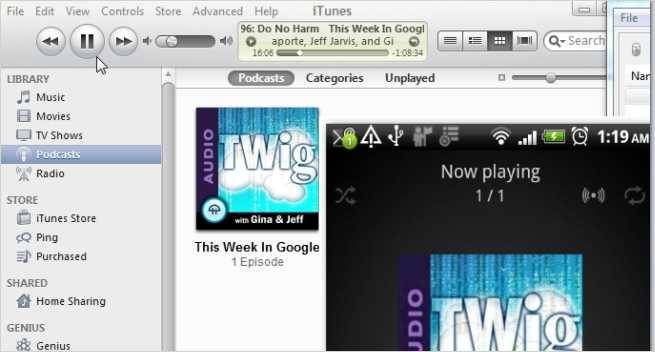
If you happen to subscribe to podcasts, and you want to listen to them in your phone, Salling Media got you covered. You can sync all your podcasts


… or simply select those you want to listen. Click the sync button once you have made up your selection, and you’ll get all your podcast in your phone.


Managing Cover Art
Although iTunes music comes with cover arts, we like to pick our own images for our musics with “cover art downloader”. It’s not only free, it also has an awesome batch cover art feature that download missing cover arts for your music.


Check your cover arts, and tap any one of them which you want to change.


Tap the search button to look for alternatives cover arts online.


Tap the one that you want, and cover art downloader will replace your current cover with the one you want.


Feel free to share any other tips on syncing iTunes and managing cover arts in the comments section.
Got Feedback? Join the discussion at discuss.howtogeek.com
Comments (27)
Zainul spends his time trying to make technology more productive, whether it’s Microsoft Office applications, or learning to use web applications to save time.
- Published 06/21/11


Been waiting for something like this. Thanks.
doubleTwist can read your iTunes library and then sync it to your device, wireless with their app Airsync($4.99).
“Use in conjunction with the free doubleTwist desktop app to automatically import your iTunes music playlists, iTunes ratings & playcounts from your Mac or PC.”
You can also use their free app doubleTwist Player to play the songs, podcast and etc.
I’ve been using iSyncr for 10 months and I couldnt be happier. Really recommend it to sync lists, playcounts, rates, and cover art.
Not having to user iTunes is one of the biggest reasons I have an android phone.
+1
I have Music Beta by Google…it works like a charm!!!!
Can’t wait to do this!
Been very happy with double twist myself. This sounds like some good software as well! Thanks for the article!!
Does it transfer movies/shows as well?
Thanks to a good friend, he keeps me updated on what he thinks I would benefit from. I’ll def use this for my Droid. Thanks n sounds easy for me too!
is there a “better than others” or preferred podcast player for the ‘droid? This, thanks to this app, will be the first time I actually listen to a podcast on my droid.
MediaMonkey! I have never used iTunes and hopefully never will. If you want to stop giving Apple every penny you have, grad yourself a copy of MediaMonkey and jump off the iBandWagon.
is there a “better than others” or preferred podcast player for the ‘droid? This, thanks to this app, will be the first time I actually listen to a podcast on my droid.
…try ‘TuneinRadio’…really great app for stations and talk + podcasts.
ok – wow … just installed it … um, wow.
thanks! Been looking for something better than doubletwist, this just might be it :)
Any recommendations for syncing play count and play postion (for podcast) between iTunes and Android?
I agree with Scott. MediaMonkey is a way more superior program than iTunes ever could be.
is there a “better than others” or preferred podcast player for the ‘droid?
Tune in is good though it did not have all the podcasts I wanted. I use stitcher it has live radio as well as a wide selection of podcasts
Connected sync sucks. There are apps available for synching over the air.
No need, Google Music Beta!
Thanks so much for this. Had 2 days of problems with doubletwist. Happy to have an alternative.
Gotta figure out where my playlists are, though. Do you just use the basic “Music Player” that came with the phone, or some other app?
I don’t let ITunes sync. I manually copy my music to my IPod. Can you manually use this software to copy or is it Sync only.
Music Monkey or Double Twist
Which is best?
Also how do you sync the contacts that are in ITunes?
Lastly, is there a cloud to compete with mobile me?
I am using TunesReflex to play my itunes in android
this software does not work for alot of android phones it only supports on a phone by phone basis and some manufactures like lg aren’t supported at all.
Doubletwist for Windows syncs very sluggishly. So I resorted to Media Go.
Media Go is from Sony so it is originally meant to sync with Sony devices like Sony Ericsson, Walkman and PSPs but it will sync with any device. Heck it even syncs flash drives if you wanted to. It’s been around for a while to so it’s fully featured.
Another (free) solution I looked up is iTunes Agent. You basically dedicate a playlist in iTunes to iTunes Agent and it’ll sync whatever you drag in that playlist. Never tried it before so I wouldn’t know exactly how it is.
all I want to sync is dice with buddies :’( and I can’t