How-To Geek
Use the Navigation Pane in Word to Easily Reorganize Documents

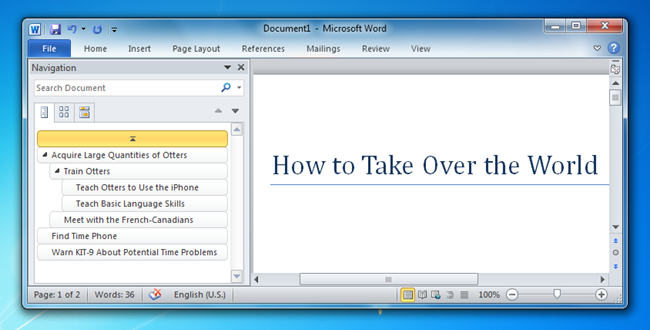
Microsoft Word has a zillion features, and even after using it for a while, you’re always finding something new. The Navigation Pane is a great feature that lets you easily skip between sections, but even more useful is the ability to use it to reorganize your documents.
Reorganizing Documents with the Navigation Pane
Simply head to the View tab and then click the Navigation Pane option to enable the panel on the left-hand side.


Now you can right-click on any heading in your document, which reveals a menu that allows you to reorganize the heading levels easily, insert new headings, or even delete an entire section. And, of course, you can simply click on one of the items to navigate to it easily.


You can also drag and drop sections around, which is really convenient when you’re trying to put together an outline.


Lastly, you can use the search box to quickly search through sections, and it’ll highlight the sections in the list. Quite handy.
Got Feedback? Join the discussion at discuss.howtogeek.com
Comments (7)
Programmer by day, geek by night, The Geek, also known as Lowell Heddings, spends all his free time bringing you fresh geekery on a daily basis. You can follow him on Google+ if you'd like.
- Published 04/14/11


Rad! Thx.
Meh! I produce documents from scratch and format them only in the end. I don’t see how this feature can really be a time saver for me.
I usually use the Outline – View to organize the document. It’s better then the navigate panel.
You can cosplase and expand it freely.
Sory for my english
Navigation Pane is not an available option under the view tab in my office 2007 Word. Where else could it be?
Mara – in Word 2007 it’s named “Document Map”
Actually – let me modify that. Navigation Pane is only present in Word 2010. Word 2007 has the Document Map feature, but it’s not (nearly) as sophisticated as the navigation pane.
I have office 2007 and I find the thumbnail option is a quick way to flick through multiple pages