How-To Geek
Stupid Geek Tricks: Quickly Switch Month/Year in the Windows 7 Calendar

Windows 7 gives the ability to quickly pull up a calendar from the taskbar by clicking on the time. What you may not know is that you can also quickly jump to dates in different months and years.
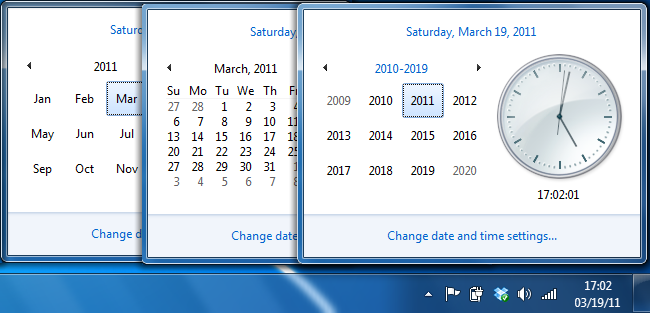
In order to see the options for jumping straight to a month, year, or decade all you have to do is click on the banner that indicates your current view.


Your view will cycle from month to year to decade but will stop at the decade view.


To go backwards you can click on whatever month, year, or decade you want to zoom into. If you want to zoom back into the current date you can also just hit enter on your keyboard because the current year and month are selected by default.


To quickly jump to the current date click on the link at the top of the window.


Got any other geek tricks you want to share? Send your tip to tips@howtogeek.com and we might feature it here.
Got Feedback? Join the discussion at discuss.howtogeek.com
Comments (9)
Justin is a Linux and HTPC enthusiast who loves to try new projects. He isn't scared of bricking a cell phone in the name of freedom.
- Published 03/21/11


If only the calendar integrated with a real calendar app to actually show appointments…
Oh ditto. Windows 7 calendar (thank you MS, I have no wish to sign up for yet another cloud service) is the lamest calendar I’ve ever used. By far. Virtually unusable.
@Matthew: Why not? :)
http://www.howtogeek.com/howto/windows-vista/display-your-google-calendar-in-windows-calendar/
nice trick
Also works in Vista, and if I remember correctly in XP as well.
Does anyone know of an keyboard shortcut to bring up the calendar in Windows 7? Even a AHK script will do.
That#s great. Thank you.
You can also hold down ctrl, and scroll with your mouse wheel once the calendar is open.. Performs the exact same functions, a little faster though.
Nice info.