How-To Geek
How to Make Ubuntu Linux Look Like Windows 7

Ubuntu has pretty good theming system, visual effects, and eye-candy stuff, but you may love the elegance of Windows 7 Aero class, transparency, or the Start Menu. Today we’ll show you how to transform Ubuntu to look like Windows 7.
Of course, it won’t be an exact match, but it’s close enough that at first glance a lot of people would think it’s Windows 7. Keep reading to see how to do this.
Installing the Win7 Theme
Let’s start by entering some commands—just open up a terminal window and enter this:
cd ~/
sudo wget http://web.lib.sun.ac.za/ubuntu/files/help/theme/gnome/win7-setup.sh
sudo chmod 0755 ~/win7-setup.sh
~/win7-setup.sh
This will download a script file that will be used later to tell your computer what files to download to complete the Win7 theme packages install. Once finished, a window will tell you that the installation will start now so just press OK.


Another window will pop up asking if you want to continue, answer yes for that window too. Now the terminal will begin downloading and installing the theme. It may take some time depending on your Internet speed. After that, a window like this will appear:


Press OK, then back in the terminal enter:
setup-win7-theme
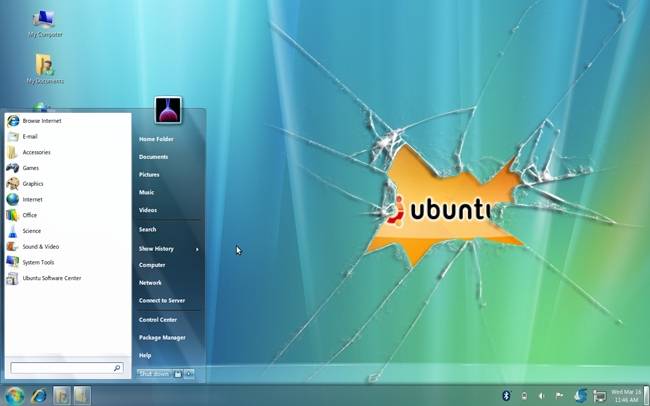
This command will setup Win7 theme and your computer will start transforming into windows style immediately. Wait for a few seconds and you will see a window asking you to logout so logout and log in again and this is what you will see:


Now your Ubuntu looks almost exactly like Windows. Congratulations! Now you have WinBuntu! You can even right-click the start button and choose “properties” to customize the start menu.
If you want, you can install Internet Explorer-like themes for Firefox. You can also use Windows 7 wallpaper for you desktop to give it a complete feel of Windows 7. The download links are down at the end of the article.
Uninstalling the Win7 Theme
During the setup of Win7 theme script, a backup of the previous Gnome settings got saved in your home folder, so if you ever get bored of this theme, you can uninstall it and rollback to previous Gnome state. The only downside though, is that there is no automatic uninstallation.
It’s not hard to do the uninstallation. Open your home folder there should be a file named “win7-uninstall.tar.gz”, open it with your archive manager and you’ll find your home folder, double-click it and you’ll see your username, double-click it too. There should be a “.gconf” file, extract that file to your home folder.


Logout and log back in, that’s it. Your theme is back to normal gnome as if nothing has happened. Cool, isn’t it?
Forcefully uninstalling
In some cases when you try uninstalling the theme it won’t uninstall completely, leaving some Windows 7 icons or desktop wallpaper. In cases like this, you’ll have to remove the theme by deleting it’s files manually but don’t worry, it is easier than you think. Just open up a terminal window and type the following command followed by the enter key.
rm -rf .gnome .gnome2 .gconf .gconfd .metacity
NOTE: This will restore your gnome appearance setting back to the default like when you first installed Ubuntu.
Got Feedback? Join the discussion at discuss.howtogeek.com
Comments (87)
Omar Hafiz is a geeky Linux user who loves customizing Ubuntu to fit his personal style. Whether it's the login screen or his Gnome panels, he's got them tweaked to perfection.
- Published 03/22/11


I’m glad Omar is now a permanent writer for HTG, because he is awesome at tweaking Ubuntu to perfection ;)
I’m going to try this on my Ubuntu LiveUSB !
P.S. One question. Can we get a windows 7 styled startup screen (splash screen) for Ubuntu?
Plymouth based, maybe?
OK. Where can I get the first background wallpaper, where we see Ubuntu beside the broken Window ? I love that !!!!
How about print-screen capture
why would anyone want people to think that you use windows.
Best of both worlds :)
@Bill – If I were installing ubuntu for a rookie that is used to using Windows, I’d use this theme. It may help lessen the learning curve a bit.
@Hatryst
You can get a Win-7 style plymouth here:
http://kde-look.org/content/show.php/Seven+Plymouth+Theme?content=128652
@Hatryst – I’m glad you liked my articles. It’s my pleasure to write for HTG and for you guys who support us with your nice comments and constructive feedback.
@Jean-Francois Messier – I made that image my self but here’s a better 1680 x 1050 version: http://www.howtogeek.com/wp-content/uploads/2011/03/Winbuntu.jpg
The wget command doesn’t need to be ran as sudo, and the only reason you would have to use sudo for the chmod is if you use sudo for the wget.
Also, there are a lot of really great themes out there that embrace the fact that Linux is not Windows. The Bisigi Project is a good example of this. They make non-Windows clone themes that show off the beauty of Gnome instead of hiding the interface behind a bunch of other software that’s unstable and changes the way a person has to work with their computer, also scaring off anybody that is new to Linux by finding the bugs in the non-default programs that make up the new scheme.
I don’t know what menu, dock, or other mods this script installs, but I have yet to find any of these “Windows-like” mods that are stable enough for productive use on a day-to-day basis. That’s my experience anyway.
I cannot thank you enough for this feature! I am a newbie trying to migrate from Windows to Ubuntu and I was very intimidated by the ‘foreign’ appearance when trying to learn and navigate around the interface. Thank you so much…this makes it so much less daunting and everything for Ubuntu is still right at my fingertips.
my installation worked just fine, but couldnt completely uninstall it. i extraced the “.gconf” file to my home folder, logged out and back in. it seemed like everything had gone back to normal, but my windows still have the “windows”-design and “my computer, my documents, my network places and the recycle bin” cant be removed from my desktop. it’s not a big inconvenience, but half windows half ubuntu looks kinda weird to me.
@Sascha – press Alt+F2 and enter “metacity –replace” this should return your windows borders back to normal. For the icons, you can use Ubuntu Tweak to remove them. Launch Ubuntu Tweak and choose “Desktop Icons” from the left panel.
thanks for the fast response. ubuntu tweak was a really good hint. worked fine, and i’m just checking out all the other features.
I’d actually love to know what your original theme was! The theme used in the first 2 dialog boxes on this article.
Does anyone knows this too?
http://tecnoblog.net/37907/deixar-ubuntu-com-cara-de-windows-7/
If so, can you tell me the difference?
As always, great work.
However, for me, changing linux to look like Windoze seems like defacing linux…
hehehe
@Simon SC – It’s Airlines theme from the Bisigi Themes Project. Here: http://www.howtogeek.com/howto/21343/give-ubuntu-a-fresh-new-look-with-bisigi-themes/
@ Carlos Ferrari – It’s the same. Just same files downloaded from different source with different file names.
@Omar Hafiz
Very easy to follow steps. Will there be another article on how to transform Ubuntu to look like Mac OS?
@Santo – Yes, actually How-to transform Ubuntu to look like Mac OSX has been written and will be published next week.
@Omar Hafiz:
Thanks for the clarification. :)
hi,
I tried to download the theme file using terminal but unsuccessful. Maybe you can check
@Santo – Not to steal Omar’s thunder but here’s the link: http://sourceforge.net/projects/macbuntu/
That is one beautiful Win7 style linux desktop. I think a lot of new Ubuntu converts will really be able to make use of this article/theme.
I like Ubuntu quite a lot, however, there are some things that I don’t like at all. First, there is a problem that I have in not being able to get documents to print on both sides of the sheet of paper even though I am using the only HP driver that Ubuntu seems to have. I am using a HP Deskjet 6840 printer. I also use USB selector switch so that I can use 3 different computers and only one printer, that I can only find windows drivers for. I also don’t like the fact that I can not get more responsive movement out of my mouse and I have it adjusted to the fastest setting that Ubuntu will allow. Does anybody have any ideas of how to address these problems?
@lankapo – I just tried downloading the theme file again and everything seems to work well. Make sure you typed the link correctly, maybe the was something wrong with your internet connection or with server you downloaded from. Try again, maybe it will work this time.
@David Lindberg – Check the options in your printing program, e.g, OpenOffice Word. As for the mouse, try increasing the threshold and/or sensitivity.
could you tell me how to install macubuntu theme
@sanyasi – An article about that will be published this upcoming week.
Hi ,
The Uninstall does not work in my case. Tried extracting the tar backupfile . Logged out and in. But it does not revert to pre-windows 7 desktop.
Any clue how to get back the gnome desktop.
Why is there no way to shut down the computer. When I click on Start>Shutdown, the popup has options to Logout or Switch User but no option to Shutdown. I think I will go back to the old style.
I can now replace my Grandma’s OS to linux !
Thanks now i can replace all he workstation in my office to Ubuntu Linux Looks Like Windows 7
Where can I get the same wallpaper as on the first screen?
Why on earth would you want to do this?
How about something like this for KDE on openSUSE ?
@ Vlad – Here it is: http://www.howtogeek.com/wp-content/uploads/2011/03/Winbuntu.jpg
@AndreiD – Maybe I’ll do one for KDE in the future.
I agree with Kevin. Who cares about Windows 7. I like the Ubuntu 10.10 desktop.
Hi,
I’m new to Ubuntu, and I’m trying to play around with Ubuntu. After playing with Win7 theme for a while, now I want to remove it but I cannot since when I extract the files, it keep saying that I don’t have permission to write to the HOME folder.
So, what should I do? Please help,
Thank you very much
@Alvin Lam – Make sure you are writing to /home/*you_name* not /home.
hey guys i am not able connect the internet on the ubuntu ultimate edition can anyone tell me is there any changes shuld be made
@abhigoku10 – Please use the forums to get help.
i can’t uninstall it
“(
Uninstall not working for me either. I extracted .gconf to my /Home/Bob folder, but a restart does not change my settings back. Meh, I haven’t reinstalled in a while, sounds like its time. I was only looking at this theme as a nice step for a friend to ease his way into Linux, I could never leave my own computer this way… too Microsoftish… but I will be putting it on his, excellent for that application, thanks for the theme!
@ Eslam and Bob – open up a terminal window and type:
rm -rf .gnome .gnome2 .gconf .gconfd .metacity
This will revert you gnome desktop to default state. Any customizations you made will be lost.
Cool idea thanks! But QUESTION :
Will this slow down my 512Mb of Ram Ubuntu machine?
The aero theme takes up alot of memory on a Windows computer, and I usally turn it of eaven on my 8Gb ram LapTop.
Please advise! And thanks!
Can this be used with Ubuntu 10.10 Netbook edition without any problem?
@ HTG
Wow, the backup and restore method used here is – um…..tripe!?
You should be telling users to backup up those locations before installing if you’re then telling them to completely remove them, thus removing ANY modifications you’ve made. Bad bad bad. This post needs some serious revision taking on board some of the other comments posted by your readers.
i dont like the windows 7 UI but i love the picture with the broken glass :D Thanks a lot!
When I click OK to install it says “Please use GNOME desktop to install windows 7 theme” but I am already using GNOME2
wget doesn’t need sudo and needlessly using it is a BAD idea
Hello, I hope somebody can help me. I have installed the theme and everything works fine except for the windows, they do not look like they are supposed to. It says the “This theme will not look as intended because the required window manager theme ‘win7-gtk’ is not installed.” Hope somebody can walk me through on how to fix this. Thank you in advance.
@ George – Try uninstalling then installing again. Maybe there was a problem during installation.
@Omar Thanks for your reply. I tried your suggestion and I get the same error. it keeps saying win7-gtk is not installed.
Are you sure you followed the procedure exactly? Can you tell me exactly how does the windows look like?
Hello everybody !
This theme is fine because the transparency is involved.
Why Ubuntu are not offering a theme with transparency ?
I tried before a compiz theme similar to this, but all compiz themes appears appears unstable.
After a reboot, the decorations disappears, along with the buttons.
Omar, this theme implies Compiz ?
@ theox – Yes it does.
Help!!!!!
my windows borders would not return
i tried everyting
Well i installed the theme it is great
when i uninstalled it the borders of the windows stayesd as the windows borders.
i tried many things but did not manage to restore them please help
@ Muqhtar – Press “Alt+F2″ and type “metacity –replace” without the quotes.
This came out PERFECT for me AND I LOVE it !!! It’s on an Asus 1000HD and, there isn’t a single flaw.
Thank you TOO much !!!
OH, I want to add….. it’s also on my main desktop running in a VMWare Player; THAT too is flawless.
when i uninstall the theme the window borders won’t return to my old ones. when i Press “Alt+F2″ and type “metacity –replace” without the quotes, they do return, but when i logout out and login back the win 7 window borders return again. is there somehow i can delete this borders in my home folder, so they can’t reappear?? thanks
@ llmb0611 – Install “Compiz Fusion Icon” It’s a program that runs in the panels and lets you choose your window manger. Once installed, click on its icon in the top panel and choose Windows Manager > Metacity.
but i won’t compiz effects to be enabled…the thing is that before i installed this win7 theme, i had compiz enabled, and when i wanted to change my theme and window borders all i had to do was right click on desktop–>change background and there under theme tab i selected customize and then selected window border i wanted…now i can’t do that..unless i select disable effects…
Have you tried changing the borders using Emerald? It should work.
but i don’t wont to use emerald. that’s the problem. i have already a couple of theme’s i saved where i’ve set everything. colours, controls, window borders, icons, coursor… that’s why i don’t want to use emerald…i uninstaled emerald. i just wan’t it to be like it was before i installed this win 7 theme
Use Compiz Fusion Icon to switch from emerald to gtk for drawing window decorations.
After installing the bottom panel has disappeared also windows every second spring from below. As though the panel tries to be launched.
What is it?
That is odd! Did you try “rm -rf .gnome .gnome2 .gconf .gconfd .metacity” ?
WoW! Its a Cool theme. I use it with Ubuntu 10.4. It work fine and its exactly Windows7. Many thanks Howtogeek
@Igor
I had the same problem as you. Did you try to install it in 11.04? If so I think this could be the reason…
I used it for a while and its a little glitchy and needs some patches. not ready for consumer use
That shattered windows wallpaper is fantastic! Thank you.
WOW, what a gr8 article! But seriously, why I will want my Linux to make Look Like Windows 7? When Linux itself is cooler than Windows, we everyone know, who already using Gnome3!
my bottom panel is not showing and the mouse cursor flashes from the loading cursor to the arrow cursor
me too
(my bottom panel is not showing and the mouse cursor flashes from the loading cursor to the arrow cursor)
I had some download errors and installation errors during installation
The start menu doesn’t work right. It only shows the top portion of the menu.
Hello…its awesome man….lyked it very much…
But the login screen is the same…how to turn it over to the windows one?
Can this be used to modify Mint 11?
Do these changes apply to all users?
Help –
I’ve done the method of uninstalling above. But the window border is still windows border style. Anyone have the solution?
Thanks
I installed Ubuntu 11.04. Trying to get the Win7 theme to install, it tell me i need to use the GNOME desktop. But i have installed the GNOME shell…is this not the same thing? Thanks for any assistance
What is the name of the start menu app please?
just right-click on the image and save it!!!
Can’t install win7 or win2-7 theme in Ubuntu 11.10
@Bhavesh
“Please use GNOME desktop to install windows 7 theme”. exactly the same problem here, Ubuntu 11.10, gnome shell or unity or gnome classic. I really want this theme coz I don’t like to let others know I’m using Ubuntu for some reasons. any help shall be greatly appreciated.
@Wing
This is for Ubuntu 10.10 Maverick Meerkat. I did not test it on 11.04 Natty Narwhal.
hi, i have ubuntu 11.10. i installed gnome desktop first and then tried to install Win7 Theme.
but when i do ‘~/win7-setup.sh’, i am getting message ‘Gnome desktop session is required. Please logout and select a Gnome desktop session during login’
any help please?
I have one question….Will this work on ubuntu 11.10? Thanks
Doesn’t work for me either (11.10). I commented out the part in the setup script that checks for Gnome and then everything installs ok except for the very last thing
Setup Gnomenu.
gnome-panel: no process
any ideas? gnome-panel is installed. thanks!