• ARTICLES
SEARCH

How-To Geek

Use a Windows 8-Like Task Manager in Windows 7, Vista, and XP

00_lead_image_win8_task_manager

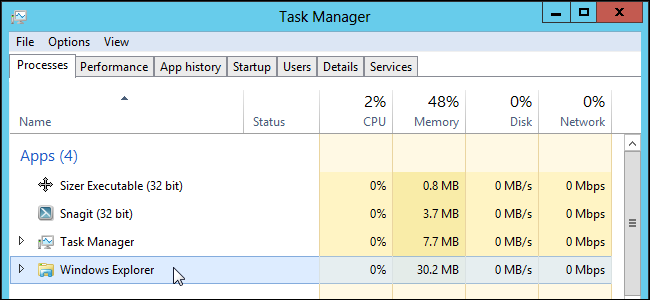
One of the new features in Windows 8 is the improved Task Manager, which provides access to more information and settings. If you don’t want to upgrade, there is a way you can use a simple Windows 8-like Task Manager in Windows 7, Vista, or XP.

The Windows 8 Metro Task Manager does not need to be installed. Simply download the .zip file (see the download link at the end of this article), extract the files, and double-click the Windows 8 Task Manager.exe file.

A window displays a list of tasks currently running with the status of each task listed. To end a task, select the task in the list and click End Task.

One advantage the Windows 8 Metro Task Manager has over the Windows 7 Task Manager is the ability to restart Windows Explorer with one click. To do so, simply click Restart Explorer.

Just like the Windows 8 Task Manager, there is a More Details link.

However, when you click the More Details link, the Windows 7 Task Manager opens to whichever tab was active the last time it was open. Unfortunately, you do not have access to the same tabs available in the real Windows 8 Task Manager.

However, the Windows 8 Metro Task Manager does provide the useful Restart Explorer button lacking in the Windows 7 Task Manager.

For easy access, you can pin the Windows 8 Metro Task Manager to the Taskbar, create a shortcut on the Desktop, or add it to the Desktop context menu.

Download Windows 8 Metro Task Manager for XP, Vista and 7 from http://vishal-gupta.deviantart.com/art/Windows-8-Metro-Task-Manager-for-XP-Vista-and-7-300826389. Microsoft .NET Framework is required to run Windows 8 Metro Task Manager. Download the Web Installer or the Standalone Installer.

Don't show again X

Don't Upgrade to Windows 8 Until You Read This Book!

Windows 8 can be confusing, but our comprehensive guide will teach you everything the easy way.


There are over a thousand screenshots and pictures to walk you through everything there is to know about Windows 8, and it's written in the classic How-To Geek style that you know and love.


Get Your Copy Now  

Comments (8)

  1. Ruja

    I fail to see how this is like the one in Windows 8. Can someone explain that to me?

  2. AD

    Thats merely a launcher for Windows Task Manager – taskmgr.exe … :(

  3. horace

    I want a quick way of closing tabs

  4. Peter Medlicott

    Don’t go there. It simply installs a AVG toolbar which needs a system restore to get rid off. It does NOT work on my laptop

  5. pbug56

    This looks like some sort of scam ware. Depending on which wrong buttons you push on that page, it either downloads something useless or tries to install some sort of scamware download manager. Hopefully someone at HTG gets rid of this article real quickly.

  6. Ram Todatry

    Is the original Task Manager still intact, as it is a major part of the Windows Infrastructure. I guess that this is just an add-on.

    I do not see restarting Windows Explorer with one click as a major feature to install more gunk on my machine.

    Thanks.

  7. Vrushank

    I don’t see how this is useful in any way. Restarting explorer (or for the matter, any process / thread) can also be done using the really good PROCESS EXPLORER, which I think from where the Win 7 Task Manager design came after Microsoft took over SysInternals.

  8. edzams

    One can get a similar experience using process explorer.

Lori Kaufman is a freelance technical writer who likes to write geeky how-to articles to help make people's lives easier through the use of technology. She loves watching and reading mysteries and is an avid Doctor Who fan.

  • Published 11/21/12

RECOMMENDED POSTS