SEARCH

How-To Geek

How to See Who Is Downloading Files From Your Network Shares in Windows 8

Have you ever been connected to a network and wanted to know if you could see who is copying stuff from your PC? Here’s how to do it with the built in Windows tools.

See Who Is Downloading Files From Your Network Shares

Press the Windows + R keyboard combination to bring up a run box, then type mmc and press enter.

This will open a blank MMC console, click on the File menu item and choose to add a snap-in.

Now go ahead and choose the Shared Folders snap-in and click the add button.

Then select the all view and click OK.

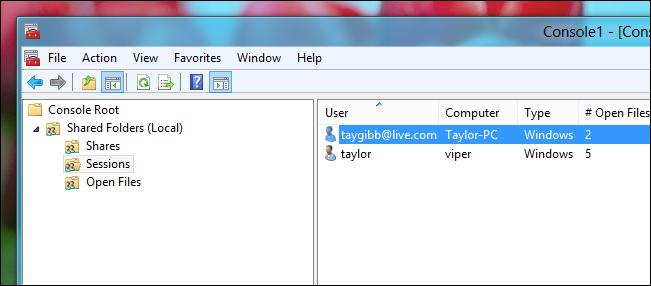
This will create the MMC Console, on the left hand side expand Shared Folders and select Sessions. On the right hand side you will get a list of users that are currently connected to your PC, you can also see exactly which files they have open.

That’s all there is to it.

Don't show again X

Don't Upgrade to Windows 8 Until You Read This Book!

Windows 8 can be confusing, but our comprehensive guide will teach you everything the easy way.


There are over a thousand screenshots and pictures to walk you through everything there is to know about Windows 8, and it's written in the classic How-To Geek style that you know and love.


Get Your Copy Now  

Comments (5)

  1. srsly tho

    I did this in windows 7 instead.
    Very useful bit of monitoring.
    Thanks.

  2. EANX

    Works on Windows Home Server too. Thanks!

  3. StevenTorrey

    What did I miss? Why would anyone want to share their computer? Not me, that’s for sure!

  4. k5cr3am

    Or you could just use computer management…

  5. Shellexecutor

    How to get window border transparency back in Windows 8?
    (Like what is shown on the screenshots)

Taylor Gibb is a Microsoft MVP and all round geek, he loves everything from Windows 8 to Windows Server 2012 and even C# and PowerShell. You can also follow him on Google+

  • Published 11/18/12

RECOMMENDED POSTS