• ARTICLES
SEARCH

How-To Geek

How to Enable or Disable the Startup Sound in Windows 7 or 8

image

We have all been in that awkward situation where you sit down in a meeting room only to have your Windows laptop play the Startup sound. Here’s how to disable it or even enable it if you so choose.

How to Disable The Startup Sound in Windows

Right-click on your Desktop and choose Personalize from the context menu.

When the Personalization control panel applet loads up, click on the Sounds link.

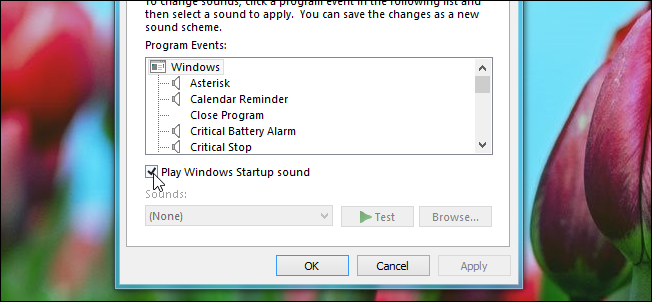
At the bottom of the Sound dialog you will see the Play Windows Startup sound checkbox, enable or disable it as you choose.

Then go ahead and click on the Apply button.

That’s all there is to it.

Don't show again X

Don't Upgrade to Windows 8 Until You Read This Book!

Windows 8 can be confusing, but our comprehensive guide will teach you everything the easy way.


There are over a thousand screenshots and pictures to walk you through everything there is to know about Windows 8, and it's written in the classic How-To Geek style that you know and love.


Get Your Copy Now  

Comments (3)

  1. Ashish

    Nice article.
    How can we change/customize the startup sound

  2. Rob

    That is also the place to go when your coworker forgets to lock their computer. Scroll down to find “new mail notification” and fix the sound for them!

  3. Al

    Is there a way to disable the sound during boot up? Maybe hold down a key while windows logs in disabling the startup sound? That would come in handy during a meeting or quiet classroom.

Taylor Gibb is a Microsoft MVP and all round geek, he loves everything from Windows 8 to Windows Server 2012 and even C# and PowerShell. You can also follow him on Google+

  • Published 10/11/12

RECOMMENDED POSTS