How-To Geek
Stupid Geek Tricks: How To Send Email From the Command Line in Windows Without Extra Software

In Windows there is no way to natively send mail from the Command Prompt, but because PowerShell allows you to use the underlying .Net Framework, you can easily create and send an e-mail from the command line.
Note: I have uploaded a sample over here, due to many requests.
Sending Email From PowerShell
Note: We decided to use the GMail SMTP Servers for this article, that means you will need a GMail account to send mail using the provided code. However, you could easily hack my script to work with any SMTP Server should you want to.
The first thing you need to do is fire up PowerShell.


It’s pretty easy to send an e-mail from PowerShell, all you need to do is copy the template we provided and change some of the details.
$EmailFrom = “yourgmailadress@gmail.com”
$EmailTo = “destination@somedomain.com”
$Subject = “The subject of your email”
$Body = “What do you want your email to say”
$SMTPServer = “smtp.gmail.com”
$SMTPClient = New-Object Net.Mail.SmtpClient($SmtpServer, 587)
$SMTPClient.EnableSsl = $true
$SMTPClient.Credentials = New-Object System.Net.NetworkCredential(“usr”, “pass”);
$SMTPClient.Send($EmailFrom, $EmailTo, $Subject, $Body)
You will need to change the following:
- $EmailFrom = Your GMail address.
- $EmailTo = The recipient’s email address.
- $Subject = What you want the subject of the mail to say.
- $Body = What you want the main part of the mail to say.
- usr = You will need to replace this with your GMail username.
- pass = You will need to replace this with your GMail password.
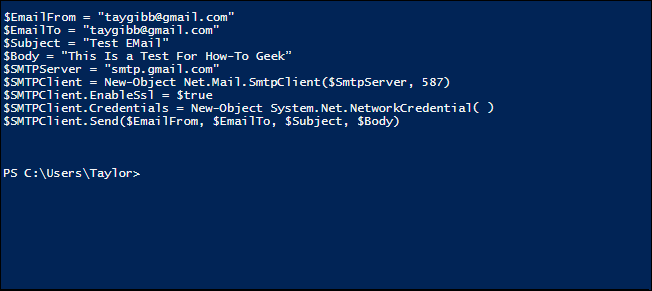
Below is an example of me sending mail to myself.
Note: For obvious reasons, I removed GMail credentials from the screenshot.


That’s all there is to it.


Got Feedback? Join the discussion at discuss.howtogeek.com
Comments (24)
Taylor Gibb is a Microsoft MVP and all round geek, he loves everything from Windows 8 to Windows Server 2012 and even C# and PowerShell. You can also follow him on Google+
- Published 07/30/12


You could try Send-MailMessage, which is a bit easier.
@Chris Send-MailMessage doesn’t work with GMail.
I have been looking for a way to email in a script. This will be helpful.
How hard would it be to include an attachment?
Not familiar with the .Net commands…
I would dispute this comment “In Windows there is no way to natively send mail from the Command Prompt” as if you know the commands and the SMTP server details you can do this via telnet which granted you have to install on 7 is a native way to do it
Update your screenshots; your Gmail credentials are still visible in the last two screenshots. Good article.
Clever. I think I prefer the utility (free) called Blat.
Exactly BV,
First thing i copied and paste the template in command window , I could not edit my user name in command window which displaying at the last line what ever i type in where i need to.
Second thing, i tried editing in notepad which was done , but i could not copy the template and paste in window.
Finally, i ended up with failure.
So, Mr. Taylor can you help with this ?
Using Windows 7.
Thanks
Pranesh
The use of port 587 implies TLS encryption which Gmail wants. It can also use SSL encryption on port 465. Is it a default of .NET to use encryption of some sort? Does the port used imply the type of encryption used and does the use of port 25 imply no encryption? Not all email servers support encryption.
Any way to do this with Hotmail?
How did you remove your directory and write the codes? I’m new to this and need all the help I can get.
I would like to see if this works with Office 365 SMTP Servers. I may try and give it a go. Does this have to be run on Windows 7. Can it be run on any of the MS Server products?
Here is how to do it with O365..
$emailSmtpServer = “SMTPSETTINGS.outlook.com”
$emailSmtpServerPort = “587″
$emailSmtpUser = “USER@domain.com”
$emailSmtpPass = “YOURPASSWORD”
$emailFrom = “Cole Slick ”
$emailTo = “Thedog@somedomain.com”
$emailMessage = New-Object System.Net.Mail.MailMessage( $emailFrom , $emailTo )
$emailMessage.Subject = “Testing e-mail”
$emailMessage.IsBodyHtml = $true
$emailMessage.Body = @”
Now if I only can get this HTML formatted.
email from my not so friendly application software with an attachment.
“@
$SMTPClient = New-Object System.Net.Mail.SmtpClient( $emailSmtpServer , $emailSmtpServerPort )
$SMTPClient.EnableSsl = $true
$SMTPClient.Credentials = New-Object System.Net.NetworkCredential( $emailSmtpUser , $emailSmtpPass );
$SMTPClient.Send( $emailMessage )
awesome trick, thanks HTG……
Any idea how I would do this if authentication to Exchange is only done through smart card authentication? No one gets a username or password. What about an attachment?
I get this error:
Exception calling “Send” with “4″ argument(s): “Failure sending mail.”
At line:1 char:17
+ $SMTPClient.Send <<<< ($EmailFrom, $EmailTo, $Subject, $Body)
+ CategoryInfo : NotSpecified: (:) [], MethodInvocationException
+ FullyQualifiedErrorId : DotNetMethodException
As Dave said above, a simple ‘telnet smtp.yourserver.com 25′ works just as well. Seems to be simpler as well.
HELO yourserver.com
MAIL FROM: me@yourserver.com
RCPT TO: blah@yourserver.com
DATA
Hello
.
Willy+1
.. got the same error:
Exception calling “Send” with “4″ argument(s): “Failure sending mail.”
At line:1 char:17
+ $SMTPClient.Send <<<< ($EmailFrom, $EmailTo, $Subject, $Body)
+ CategoryInfo : NotSpecified: (:) [], MethodInvocationException
+ FullyQualifiedErrorId : DotNetMethodException
Geeky :)
Sure you can do it from the command prompt in Linux, Mac or Windows. Just google for sending emails with telnet. Any shell with telnet can send an email. Powershell is not needed for this.
Um, isn’t PowerShell “extra software”? Just sayin’.
you could send email via telnet.
What is the command to use BCC:?
the method above tutorial, didn’t required an ‘$pass’ . means that we can use it as fake mailer!