How-To Geek
How to Edit the Windows Context Menu the Easy Way

Editing the Windows context menu can be done manually by hacking away at the Registry, but you may not be ready to dig in there just yet, in that case read on to see how you can get the registry keys generated for you.
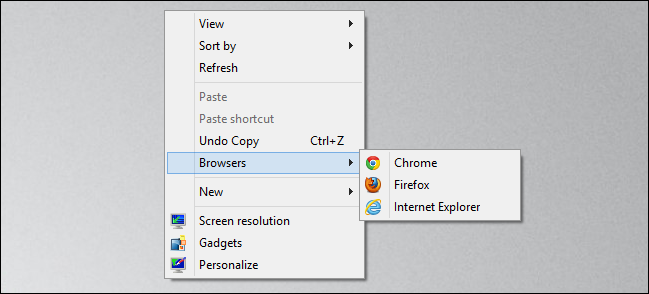
Creating Your Own Context Menu Items
Head over to the Win7 Utilities website and grab a copy of the portable version of Your Menu.


Once downloaded fire up the application and give your menu a name.


Now click on the next text box which will bring up a file browser, here you can select the file that you wish to launch from the context menu.


Then go ahead and click on the Generate REG file button.


Once you have selected a location to save the registry entries, you will notice that two files were created. One file creates the context menu entries, and the other is incase you wish to undo the changes at a later stage.


When you go to insert the new registry keys you will be warned about trusting the source of the file, just click yes to continue.


That’s all there is to it.


Got Feedback? Join the discussion at discuss.howtogeek.com
Comments (17)
Taylor Gibb is a Microsoft MVP and all round geek, he loves everything from Windows 8 to Windows Server 2012 and even C# and PowerShell. You can also follow him on Google+
- Published 07/23/12


what is this windows7 virtual style? tell me.
Its Windows 8 I belive
@jojiegropkegr Dave is in fact correct, i am running the Windows 8 RP.
Web site not working for me.
http://www.win7utilities.com/ is off line
Is this valid for XP as well?
I wish the headlines for these articles would include the versions of Windows that they apply to.
Site is working now !
Works for win.7 only
@Rufus – think the clue might be in the name of the website!
Whilst this is by no means the most useless thing to appear on HTG I’ve gotta say that the problem that most people face is actually getting rid of context menu entries not adding to them. You’re particularly unlikely to need to add anything for VLC!
@Barry Don’t forget we have written about that before:
http://www.howtogeek.com/118731/how-to-clean-up-your-messy-windows-context-menu-with-ccleaner/
Umm, I’m wondering how this works… is it just a way of launching programs.. or does it launch them with parameters.. e..g the folder or file you clicked on.
Do entries added apply to EVERY object, or is there some way of specifying the applicable file types for which the entry is to appear.. or file/folder.. or folder or drive only..
I’ve looked at the screenshots on the site, ad it isn’t clear. Oh, I’m using Vista ..yes, it’s fine, really.. so I’m excluded. (Court of Human Rights?..)
Maybe Open++ http://dengdun.webs.com/ is a more complete solution. Certainly it offers all the ‘associate with’ and arguments options you want.
See Vishal Gupta’s comments..
http://www.askvg.com/open-useful-context-menu-shell-extension/
Oh, and did I mention it includes Vista, and versions for x86 & 64 bit?
I use FileMenu Tools
seems like it does above and maybe more?
@Doug S I haven’t heard of FileMenu Tools, but ill take a look into it.
You got me confused there, I was hoping to EDIT the current menu and not just add a few applications, which I don’t see useful at all.
@Taylor Gibb whoa its cool theme thx man. :)
Hey, Thaks after a long search i found this usefull utility. take care.
The Best way to edit context menu is using “Ultimate Windows Context Menu Customizer”