• ARTICLES
SEARCH

How-To Geek

How to Access Metro Apps from Windows Explorer in Windows 8

image

Windows 8 comes with its new Metro Start Screen, which makes it easy to launch your Metro apps from that screen, but did you know you can access them from Windows Explorer too? Here’s how to do it.

To get started you need to create a shortcut, so right-click on the desktop, and choose New –>  Shortcut.

When you are asked for the location of the item, use the following:

%windir%\explorer.exe shell:::{4234d49b-0245-4df3-b780-3893943456e1}

Give your shortcut a name, like All Apps and click finish.

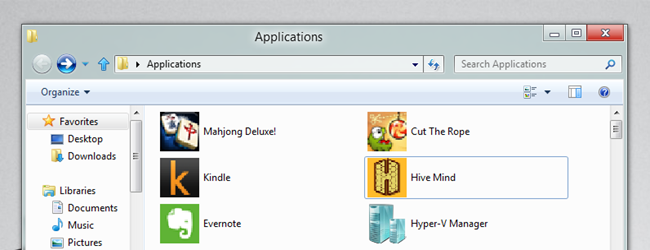
If you open the shortcut you will see it has all your apps, including your Metro apps, conveniently in one place.

Now you can just double click on any app to launch it.

Don't show again X

Don't Upgrade to Windows 8 Until You Read This Book!

Windows 8 can be confusing, but our comprehensive guide will teach you everything the easy way.


There are over a thousand screenshots and pictures to walk you through everything there is to know about Windows 8, and it's written in the classic How-To Geek style that you know and love.


Get Your Copy Now  

Comments (10)

  1. david

    Even better, how do I delete these so I never have to see them ever, ever again?

  2. Fantasm

    Yeah, I could care less if I ever use Metro… I honestly think I’ll skip windows 8 and see what Windows 9 brings… or stay with Windows 7

  3. canon50

    Didn’t work, I can’t find it. Checked search not around.

  4. GaryJ

    Another great example of how MS continues to make everything so user-friendly. No wonder they’re crushing Apple.

  5. Ronald Reynolds

    This new Demo .. I just love it !!
    Its the Cat ass ,, thank you and thank you again..
    I do everything in this Windows 8.
    Runs Battlefield 3 perfectly , and every other game all 30+
    I even did a fresh install on a 500gb drive know problems..
    I hardly boot windows 7 any more..
    Must be close to finished..
    Thank you again..

  6. r

    ya’,…that’s what I was thinking too. Windows 8 is pretty much like my cat’s ass.

  7. jackson

    Good to know about the How to Access Metro Apps from Windows Explorer in Windows 8.It is really useful.

  8. Rebwarit

    Siah

  9. Costanan

    Doesn’t work as shown. I’m guessing the long value changed with an update that was just sent out?

  10. GBytes

    Is it possible to run (via the run dialog box, or create a shortcut) of a specific Metro app?

Taylor Gibb is a Microsoft MVP and all round geek, he loves everything from Windows 8 to Windows Server 2012 and even C# and PowerShell. You can also follow him on Google+

  • Published 03/21/12

RECOMMENDED POSTS